Email OTP Authentication
Email OTP is a two-step flow that works on any platform, including those without a supported silent provider. In the Creation Kit context, it is the primary auth method for mod authors connecting their CurseForge account to the editor and uploading mods directly from the tool.
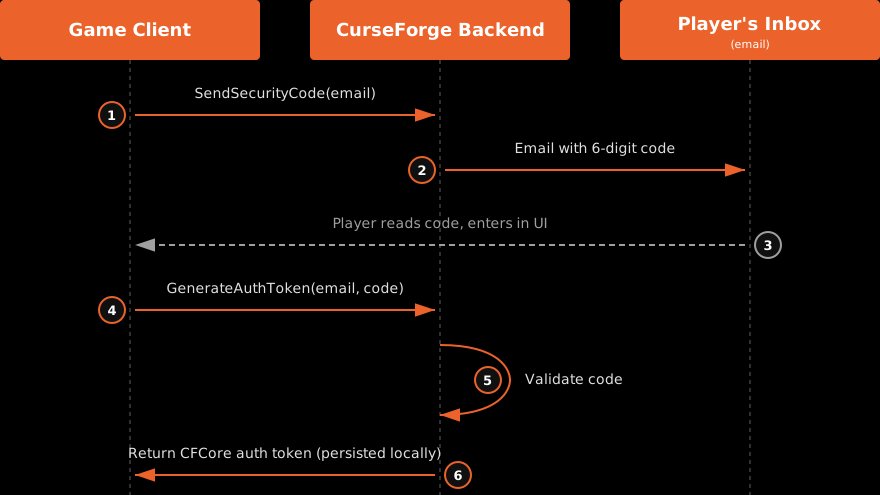
- Game client calls SendSecurityCode with the player's email address.
- CurseForge backend emails a one-time 6-digit code to the player's inbox.
- Player reads the code and enters it in the game UI.
- Game client calls GenerateAuthToken with the email and entered code.
- CurseForge backend validates the code.
- CurseForge issues an auth token; the SDK persists it locally.
How it works:
- Collect the player's email address in your game UI.
- Call
SendSecurityCode. This triggers a one-time code email sent from CurseForge to the player. - Display an input for the code in your UI.
- Call
GenerateAuthTokenwith the email address and the entered code to complete authentication.
// Step 1 — request the code
CFCoreContext::GetInstance()->Authentication()->SendSecurityCode(
    PlayerEmail,
    []() {
        // Code sent — show OTP input UI
    },
    [](const FCFCoreError& Error) {
        // Handle error (invalid email format, rate limit, etc.)
    });

// Step 2 — exchange the code for a token
CFCoreContext::GetInstance()->Authentication()->GenerateAuthToken(
    PlayerEmail,
    EnteredCode,    // int32 — the 6-digit code entered by the player
    []() {
        // Authenticated successfully
    },
    [](const FCFCoreError& Error) {
        // Wrong code, expired, etc.
    });
Blueprint: Call Send Security Code Email first, then Generate Auth Token from Email Code once the player enters their code.
UX note
Surface the email sign-in prompt at a natural moment rather than forcing it at game launch, for example when the player first tries to rate a mod or purchase a premium mod.